솔직히 말씀드리면, 저는 "AI로 서비스 하나를 통째로 만들었다"는 글을 볼 때마다 좀 의심의 눈초리를 보냈습니다. 대부분 투두 앱이나 간단한 CRUD가 전부이고, 실제 사용자에게 서비스할 수준의 결과물은 아닌 경우가 많았거든요. 근데 이번에 직접 해보고 나서 생각이 좀 바뀌었습니다. Claude Code 하나로 결제 시스템까지 갖춘 SaaS를 2주 만에 만들어버렸으니까요.
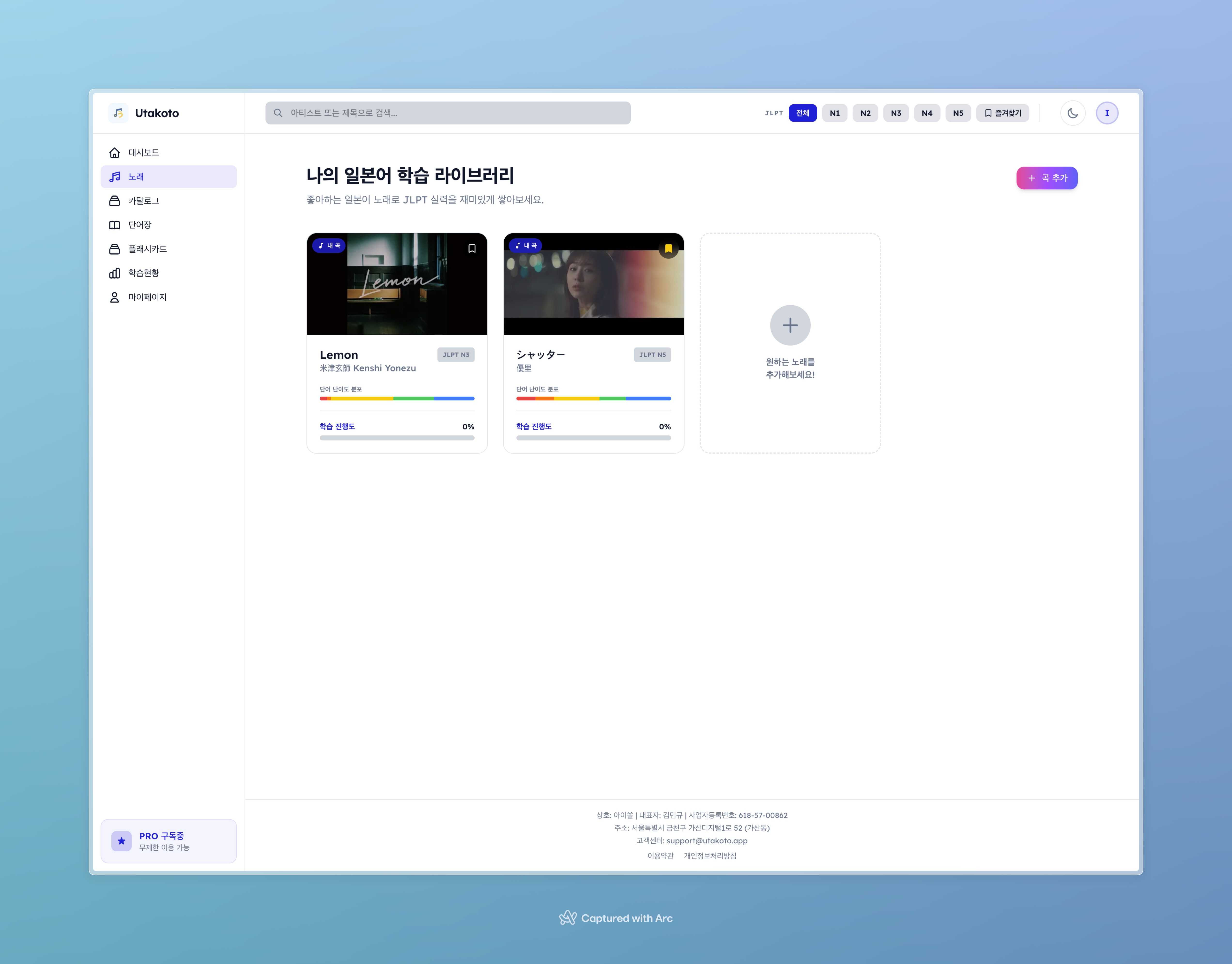
Utakoto 곡 라이브러리. 각 곡의 처리 상태, JLPT 단어 분포, 학습 진행률이 한눈에 보인다.
이 글은 제가 Utakoto(우타코토)라는 일본 음악 기반 일본어 학습 서비스를 Claude Code CLI만으로 만든 과정의 회고입니다. 뭘 만들고 싶었는지, 어떻게 만들었는지, 그리고 뭘 배웠는지 솔직하게 풀어보겠습니다.
TL;DR
프로젝트: Utakoto — 좋아하는 J-pop으로 일본어 단어를 학습하는 SRS 플랫폼 개발 기간: 2주 (2026.02.18 ~ 2026.03.03) 규모: 84커밋, 235개 소스 파일, 27,679줄 TypeScript/React 코드 기술 스택: Next.js 15 + React 19 + Supabase + Inngest + Lemon Squeezy 도구: Claude Code CLI (Anthropic 공식 터미널 AI) 결과: 인증, 곡 관리, 12단계 비동기 파이프라인, SRS 플래시카드, 4단계 난이도, 구독 결제, 데이터 내보내기까지 풀스택 완성
뭘 만들고 싶었나: 문제의 시작
J-pop을 좋아합니다. 요네즈 켄시나 YOASOBI 노래를 들으면서 "이 가사가 무슨 뜻이지?" 하고 검색하는 일이 잦았는데요. Genius에서 가사를 찾고, 단어를 하나하나 사전에서 검색하고, Anki에 수동으로 카드를 만드는 과정이... 솔직히 너무 번거로웠습니다.
그래서 생각했습니다. YouTube URL 하나만 던지면 가사를 자동으로 가져오고, 단어를 추출하고, JLPT 레벨까지 분류해주는 서비스가 있으면 좋겠다고. 거기에 SuperMemo-2 알고리즘으로 복습 일정까지 잡아주면? 이건 제가 진짜로 쓸 물건이었습니다.
기존에 비슷한 서비스가 없었냐면, 완전히 없진 않았습니다. 하지만 대부분 가사만 보여주거나, 단어를 추출해도 복습 시스템이 없거나, UI가 2010년대에서 멈춰 있었습니다. "음악 → 단어 추출 → SRS 학습"이라는 풀 파이프라인을 제대로 구현한 건 못 봤습니다.
목표 vs 현실: 2주의 기록
원래 계획
항목 목표 기본 CRUD 곡 추가/삭제/목록 가사 파이프라인 YouTube URL → 가사 → 단어 추출 학습 기능 플래시카드 + SRS 인증 이메일 + OAuth 반응형 모바일/데스크톱 결제 구독 시스템 계획 자체는 어찌 보면 '일반적인 SaaS 기능 목록'이었습니다. 문제는 이걸 혼자서, 그것도 2주 안에 해야 한다는 거였죠.
실제 결과
2주 후 코드베이스를 열어보니 이런 상황이었습니다:
지표 수치 총 커밋 84개 소스 파일 235개 (.ts/.tsx) 코드 라인 27,679줄 API 엔드포인트 36개 DB 테이블 14개 비동기 파이프라인 단계 12단계 솔직히 결과물의 규모를 보고 저도 좀 놀랐습니다. 첫 10일 만에 기본 기능을 다 만들고, 남은 며칠 동안 4단계 난이도 UI, 데이터 내보내기, 모바일 다크모드, Lemon Squeezy 결제 연동까지 마무리했습니다. 혼자 2주 만에 이 정도를 만들 수 있다는 건 분명히 Claude Code의 힘이 컸습니다.
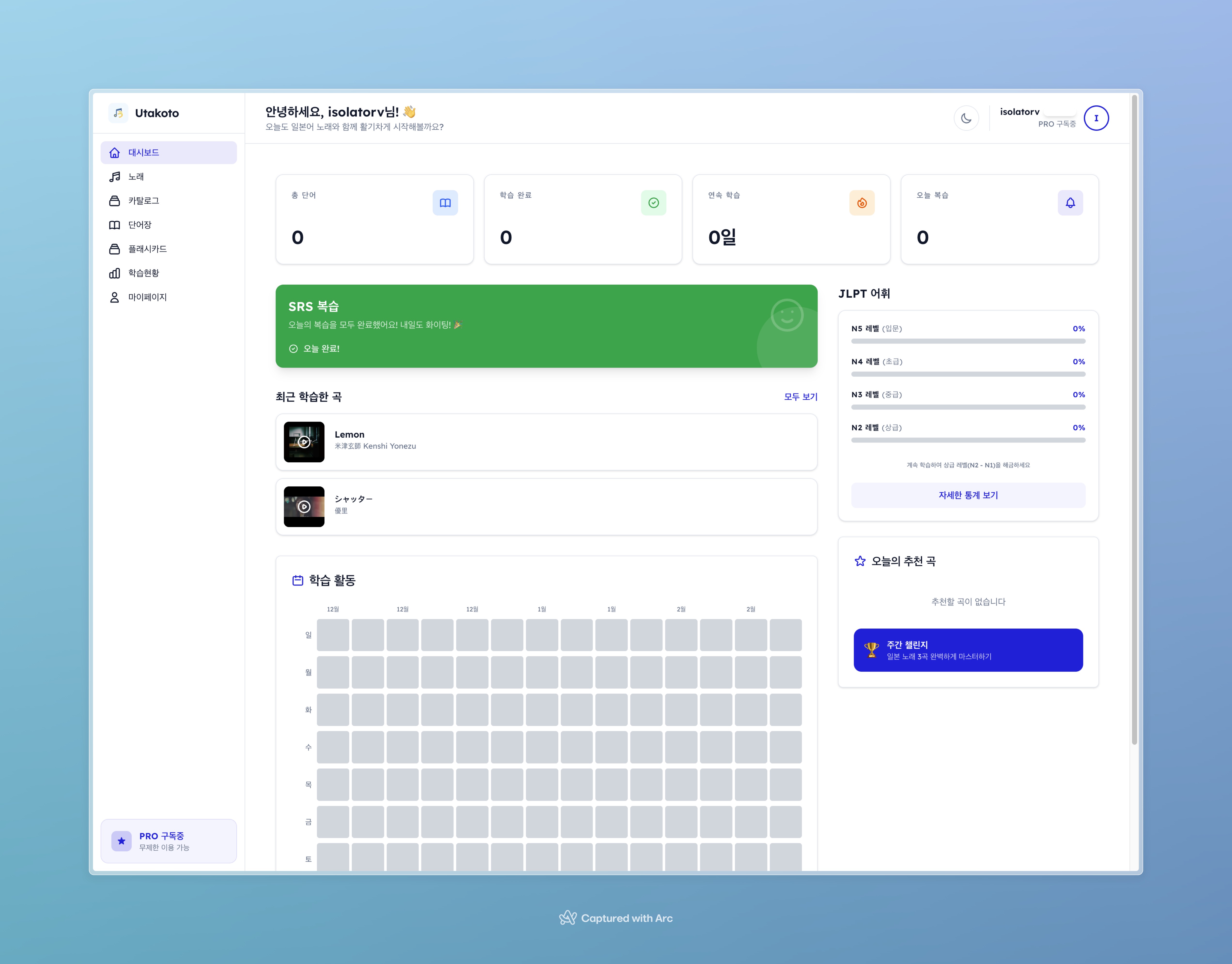
대시보드 화면. 총 단어, 아는 단어, 복습 예정 카드 수와 JLPT 레벨별 분포를 한눈에 볼 수 있다.
가장 큰 삽질 TOP 3
1. 12단계 비동기 파이프라인: 생각보다 복잡한 '자동화'
YouTube URL 하나를 넣으면 노래가 학습 가능한 상태가 되기까지 12단계를 거칩니다. 간단히 나열하면:
URL 입력 → 중복확인 → YouTube 메타데이터 → 아티스트 등록 → 가사검색(4개 프로바이더) → 저장 → 형태소분석(kuromoji) → 후리가나 생성 → 번역(Gemini API) → 단어추출 → JLPT태깅 → 한국어발음 → status: ready이걸 동기로 처리하면 사용자가 1분 넘게 로딩 화면을 보게 됩니다. 그래서 Inngest로 비동기 잡 큐를 구성했는데, 여기서 삽질이 시작됐습니다.
각 단계마다 실패할 수 있는 지점이 다릅니다. 가사를 못 찾으면? 형태소 분석기가 예외를 뱉으면? Gemini API 할당량이 초과되면? Claude Code에게 "각 단계에서 실패 시 status를 적절히 업데이트하고, 부분 성공도 허용하라"고 지시하는 게 핵심이었습니다. 한 번에 완벽한 코드가 나오진 않았고, 에러 케이스를 하나씩 발견할 때마다 수정을 반복했습니다.
// Inngest 파이프라인의 핵심 패턴 const processSong = inngest.createFunction( { id: "process-song", retries: 2 }, { event: "song/process.requested" }, async ({ event, step }) => { // 각 step은 독립적으로 재시도 가능 const metadata = await step.run("fetch-metadata", async () => { return await fetchYoutubeMetadata(event.data.youtubeUrl); }); const lyrics = await step.run("search-lyrics", async () => { // YouTube Captions → AZLyrics → Genius → SerpAPI 순차 시도 return await searchLyrics(metadata.artist, metadata.title); }); // ... 12단계까지 이어짐 } ); AI 번역 부분에서도 꽤 고민이 있었는데요. 이 주제에 대해서는 AI 번역 실전 대결: DeepL Pro vs Google Translate AI에서 더 자세히 다뤘는데요, 결국 Gemini API를 선택한 이유는 가사라는 특수한 맥락 때문이었습니다. 노래 가사는 일반 텍스트와 달리 시적 표현이 많아서, 번역 품질이 꽤 중요했거든요. 거기에 Translation Memory 캐싱까지 구현해서 동일 텍스트 재번역을 방지했습니다.
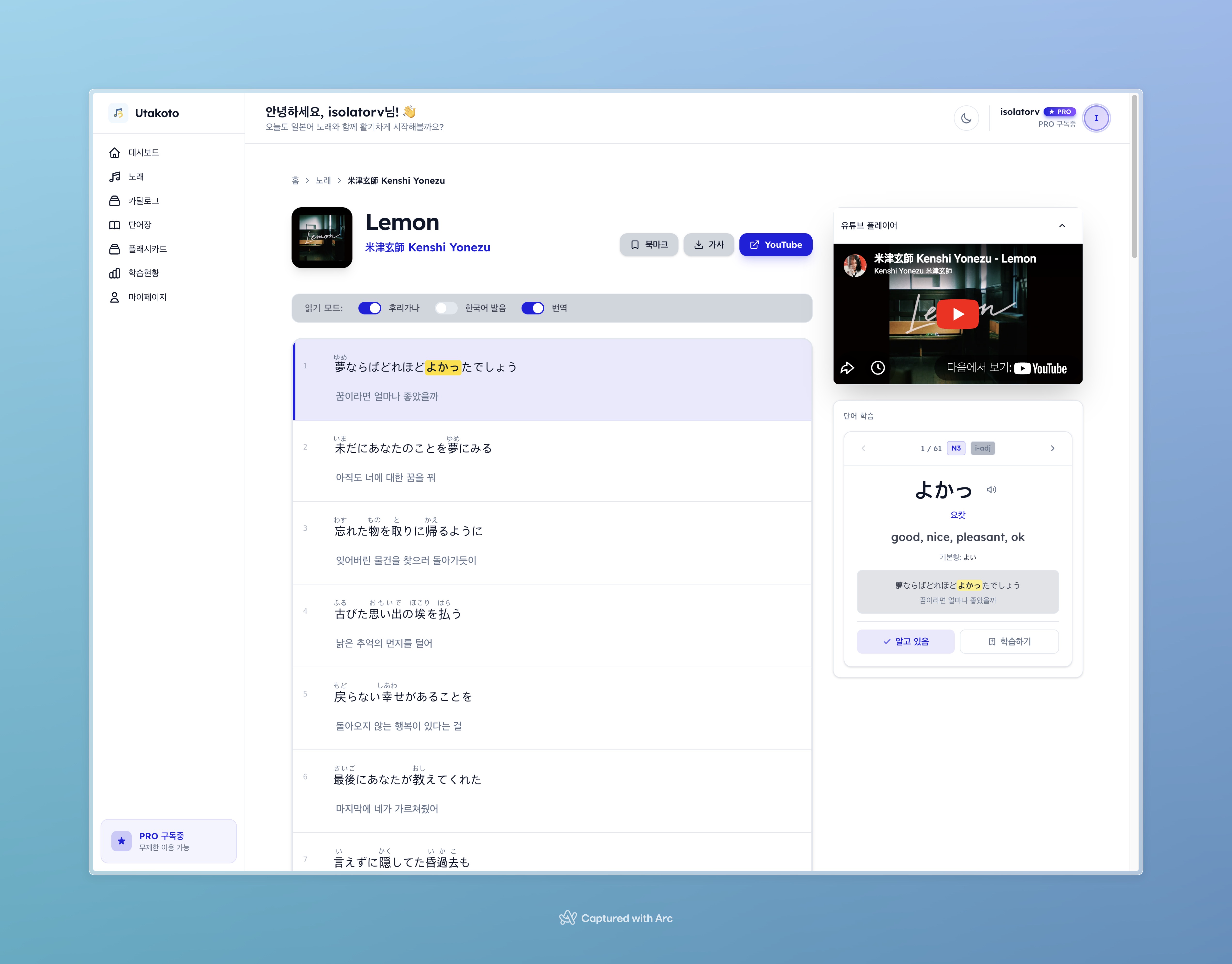
곡 상세 페이지. 왼쪽에 YouTube 플레이어, 가운데에 줄별 가사(원문 + 후리가나 + 번역 + 한국어 발음), 하단에 단어 캐러셀이 배치된다.
2. 게스트 모드: 예상치 못한 난이도
"비회원도 1곡은 체험할 수 있게 하자"는 단순한 기획이었습니다. Supabase의 익명 인증(signInAnonymously())을 쓰면 금방이겠지... 라고 생각했는데요.
현실은 이랬습니다:
익명 사용자도 Supabase 세션은 있으니 API가 동작해야 함 근데 1곡 제한은 걸어야 함 곡 추가 시 한도 초과면 로그인 유도 모달을 띄워야 함 OAuth로 전환할 때 기존 데이터를 보존해야 함 (linkIdentity()) 30일 지난 익명 사용자는 자동 삭제해야 함 (Inngest 일일 크론) 커밋 로그를 보면 게스트 관련 fix 커밋만 10개가 넘습니다. fix: handle 401/403 for guest users, fix: show login prompt modal on 401/403, fix: skip 401→/login redirect on guest-allowed paths... 하나 고치면 다른 데서 터지는 전형적인 엣지 케이스 지옥이었습니다.
결국 데스크톱과 모바일 모두에서 GuestBanner(dismissible)와 LoginPromptModal을 제대로 구현하고 나서야 안정화됐습니다. 모바일에서는 MobileGuestBannerWrapper라는 별도 래퍼까지 만들어야 했고요.
3. 모바일/데스크톱 분기: "반응형이면 되겠지"의 함정
처음엔 Tailwind의 반응형 브레이크포인트로 해결하려 했습니다. 근데 화면 구조가 너무 달랐습니다. 데스크톱은 사이드바 + 헤더, 모바일은 하단 탭 + 모바일 헤더. 결국 라우트를 완전히 분리했습니다.
데스크톱: src/app/(main)/songs/page.tsx 모바일: src/app/m/(protected)/songs/page.tsx미들웨어에서 UA를 감지해 서버 사이드 rewrite를 하고, 클라이언트에서는 ViewportRouter 컴포넌트가 window.innerWidth < 768이면 /m/*으로 리다이렉트합니다. 이게 꽤 괜찮은 패턴인 게, 각 플랫폼에 최적화된 컴포넌트를 쓸 수 있거든요. 다만 코드 중복이 좀 생기는 트레이드오프는 감수해야 합니다.
모바일에서도 다크/라이트 테마 전환이 필요했는데, MobileThemeWrapper라는 컴포넌트를 만들어서 동적 배경 스타일을 적용했습니다. 처음엔 다크 모드만 하드코딩했다가, 결국 데스크톱과 동일하게 next-themes 기반 토글을 구현했습니다. 이것도 삽질치고는 의외로 시간을 많이 잡아먹었네요.
Claude Code는 어떻게 썼나
워크플로우
Claude Code는 Anthropic이 2025년에 출시한 공식 CLI 도구입니다. VS Code 확장이 아니라 터미널에서 직접 대화하며 코딩하는 방식인데요. Anthropic 공식 문서(2026년 2월 기준)에 따르면, Claude Code는 파일 읽기/쓰기, 터미널 명령 실행, Git 조작까지 가능한 에이전틱 코딩 도구입니다.
제가 실제로 사용한 패턴은 이랬습니다:
기능 정의서(FEATURE_SPEC.md)를 먼저 작성 — Claude Code가 참조할 수 있도록 프로젝트 루트에 둠 API 명세서(API_SPEC.md)도 함께 작성 — 엔드포인트, 요청/응답 형식, 에러 코드까지 사전 정의 기술 정의서(TECH_SPEC.md)로 아키텍처 문서화 — 데이터베이스 스키마, 인증 흐름, 결제 시스템까지 상세 기술 "이 기능 만들어줘"라고 대화 — Claude Code가 스펙 문서를 읽고 코드를 생성 빌드/테스트 → 에러 수정 반복 — 에러가 나면 Claude Code에게 에러 메시지를 보여주고 수정 요청 이 방식의 핵심은 스펙 문서의 품질입니다. Claude Code가 아무리 똑똑해도 "뭘 만들어야 하는지" 모르면 엉뚱한 걸 만듭니다. 저는 기능 정의서에 상태값(processing | ready | partial | error | no_lyrics), 필드명(songId not id), 플랜 제한(Guest: 1곡, Free: 5곡) 같은 디테일을 전부 명시했습니다. 스펙 문서만 3개 파일, 총 700줄이 넘습니다.
Stack Overflow 블로그 'AI 세상에서 살려면, 아는 것이 절반'에서도 다뤘듯이, AI 코딩 도구를 잘 쓰려면 개발자 본인이 "무엇을 만들어야 하는지" 명확히 알고 있어야 합니다. Claude Code는 실행자이지, 기획자는 아닙니다.
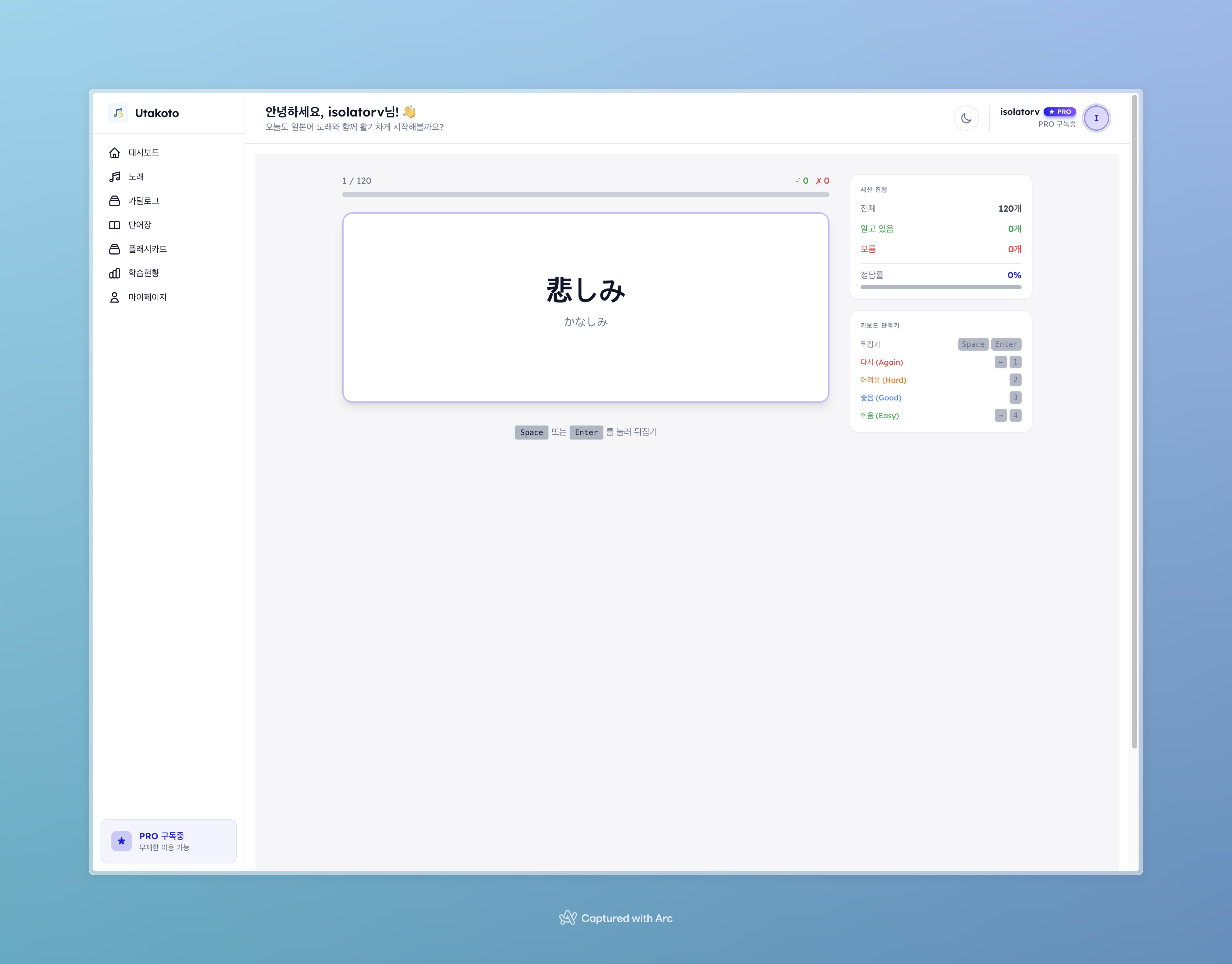
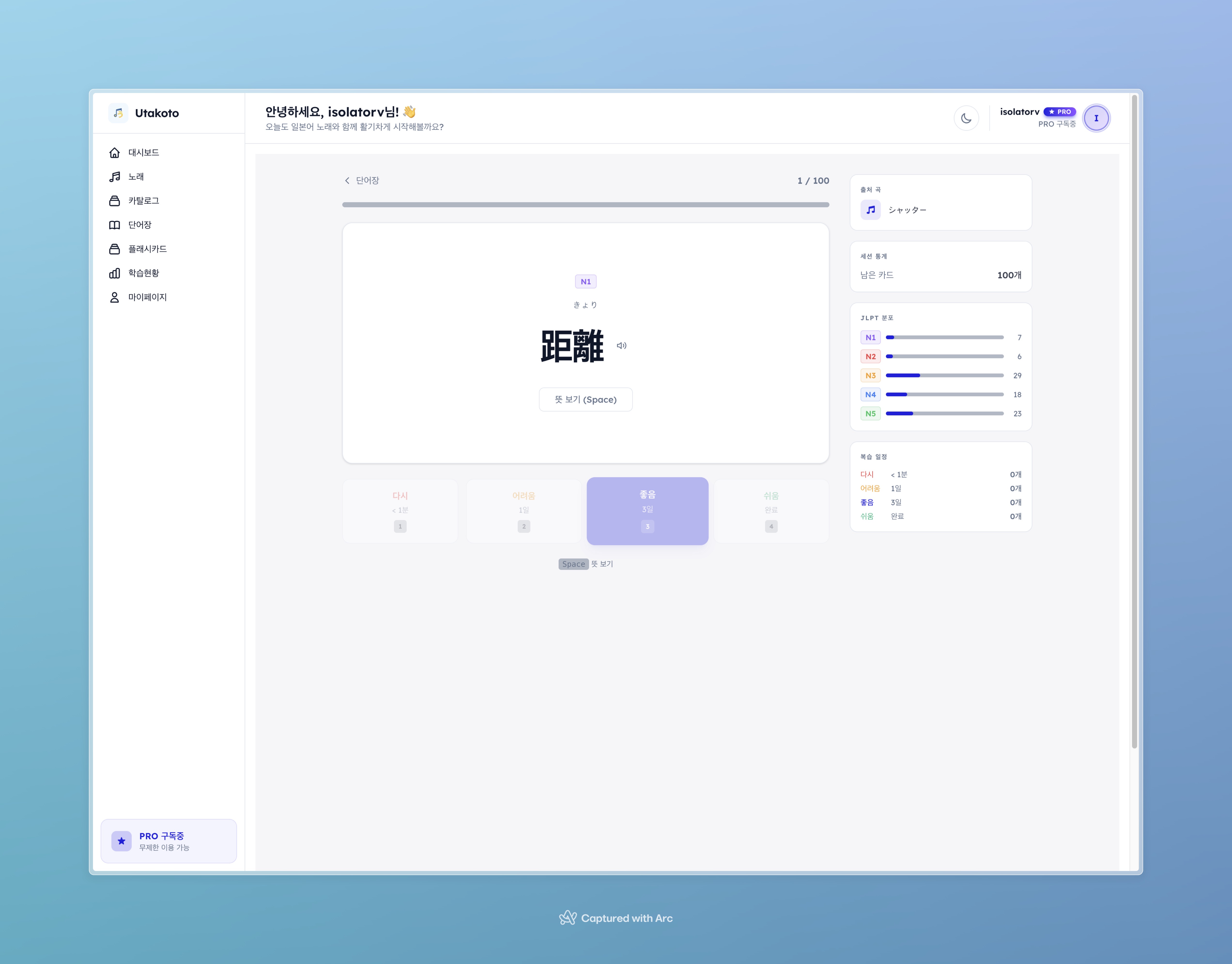
플래시카드 학습 화면. 카드를 플립하면 의미와 예문이 나오고, Again/Hard/Good/Easy 4단계로 난이도를 선택한다.
Claude Code가 잘한 것
반복적인 CRUD와 보일러플레이트는 정말 빠릅니다. API 라우트 36개를 만들 때, 첫 번째 라우트의 패턴(Supabase 클라이언트 생성 → 인증 확인 → 쿼리 → 응답)을 보여주니 나머지는 일관된 스타일로 쭉 만들어줬습니다.
에러 디버깅도 꽤 유용했습니다. 빌드 에러나 타입 에러가 나면 에러 메시지를 붙여넣기만 하면 원인을 파악하고 수정안을 제시합니다. TypeScript strict 모드에서 발생하는 타입 에러를 잡는 데 특히 좋았습니다.
Playwright E2E 테스트 작성도 기대 이상이었습니다. auth, songs, flashcards 등 테스트 시나리오를 설명하면 storageState 패턴, 세션 관리까지 고려한 테스트 코드를 작성해줬습니다.
Claude Code가 못한 것
비즈니스 로직의 엣지 케이스는 직접 찾아야 했습니다. 게스트 모드에서 발생하는 인증 타이밍 이슈나, SRS 알고리즘의 경계 조건 같은 건 Claude Code가 먼저 발견해주지 않았습니다. 기능이 "대체로 동작"하는 코드를 빠르게 만들어주지만, 프로덕션 수준의 견고함은 개발자의 몫이었습니다.
디자인 결정도 마찬가지입니다. "사이드바에 뭘 넣을까", "플래시카드 UX를 어떻게 할까" 같은 결정은 제가 했고, Claude Code는 그 결정을 코드로 구현하는 역할이었습니다.
기술 스택 회고: 다시 한다면?
선택 만족도 다시 한다면? Next.js 15 (App Router) ★★★★☆ 유지. Server Components가 SSR 성능에 좋음 Supabase ★★★★★ 유지. Auth + DB + RLS가 한 패키지. 익명 인증까지 지원 Inngest ★★★★☆ 유지. 12단계 비동기 파이프라인 + 구독 갱신 크론 + 게스트 정리 크론까지 완벽 Tailwind v4 ★★★★☆ 유지. v4의 새 문법에 적응기가 있지만 결과는 좋음 kuromoji ★★★☆☆ 고민. 번들 사이즈가 큼. MeCab 서버 사이드 대안 검토 Lemon Squeezy ★★★★☆ 유지. 글로벌 카드 결제가 간편. 한국 카드는 추후 PortOne V2 추가 예정 TanStack React Query ★★★★★ 유지. 서버 상태 캐싱이 깔끔하고 staleTime 전략이 유연 결제 시스템 이야기를 좀 더 하자면, 처음에는 PortOne V2(Toss 연동)로 시작했다가 Lemon Squeezy로 바꿨습니다. 이유는 간단합니다 — 초기 사용자 규모에서 PG 심사를 기다리느니 Lemon Squeezy의 체크아웃 세션 방식이 훨씬 빨랐거든요. 웹훅으로 subscription_created, subscription_updated 이벤트를 받아서 처리하는 패턴이 꽤 깔끔합니다. 한국 카드 전용 결제는 국내 사용자가 늘면 PortOne을 추가할 계획입니다.
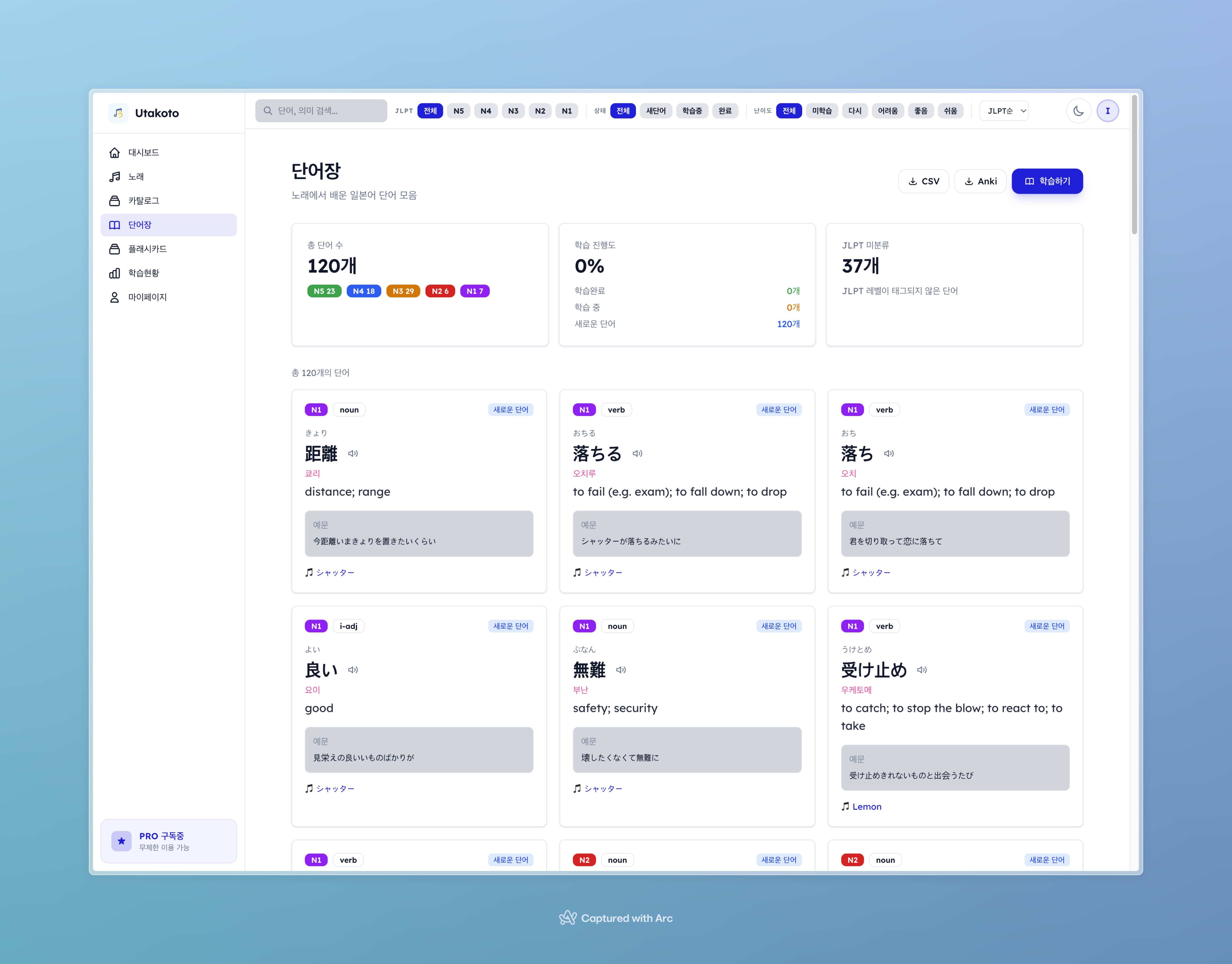
단어 목록 페이지. JLPT N1~N5 필터, 상태(new/learning/known) 필터, 검색 기능으로 단어를 관리한다.
v1을 넘어서: 2주 차에 추가한 것들
첫 10일로 핵심 기능을 완성한 뒤, 나머지 며칠간 "진짜 서비스"가 되기 위한 마무리 작업을 했습니다. 이 단계에서 추가된 것들이 꽤 많습니다.
4단계 난이도 UI. 처음에는 "알고있음/모름" 이진 방식이었는데, SRS 학습 효율을 위해 Again(완전히 모름) / Hard(어렵게 기억) / Good(약간 망설임) / Easy(완벽히 기억) 4단계로 확장했습니다. DifficultyButtons 컴포넌트를 만들어서 quality 값을 1/2/4/5로 매핑합니다.
데이터 내보내기. Pro 사용자가 단어장을 CSV/Anki 형식으로 다운로드할 수 있게 /api/export/csv, /api/export/anki 엔드포인트를 구현했습니다. canExport 기능 게이팅으로 무료 사용자는 제한됩니다.
모바일 계정 설정 페이지. /m/profile/account 하위에 비밀번호 변경, 구독 관리 서브페이지를 추가했습니다. 데스크톱에는 /profile과 /mypage를 별도로 만들었고요.
TTS(음성 출력). Web Speech API 기반 SpeakButton 컴포넌트를 만들어서 가사 각 줄의 발음을 들을 수 있게 했습니다. 일본어 학습에서 발음 확인은 꽤 중요한 기능이라 반응이 좋았습니다.
예문 채굴(Mined Sentences). 가사 학습 중 마음에 드는 문장을 저장하는 기능입니다. /mined-sentences 페이지에서 모아 볼 수 있고, 사이드바 네비게이션에도 "문장 저장" 항목을 추가했습니다.
곡 상세 페이지의 단어 캐러셀. 추출된 단어를 수평 스크롤로 훑어볼 수 있다.
수치로 보는 결과
항목 수치 개발 기간 2주 (2026.02.18 ~ 03.03) 총 커밋 84개 소스 파일 수 235개 코드 라인 수 27,679줄 API 엔드포인트 36개 DB 테이블 14개 비동기 파이프라인 12단계 지원 인증 방식 이메일 + Google OAuth + 게스트(익명) 구독 플랜 Guest(1곡) / Free(5곡) / Pro(무제한) 결제 Lemon Squeezy (글로벌 카드, 월 ₩1,900 / 연 ₩19,000) 모바일 대응 전용 라우트 완전 분리 + 다크/라이트 테마 SRS 알고리즘 SuperMemo-2 (4단계 난이도) GPT-5.2의 40만 토큰 컨텍스트 시대에서도 다뤘듯이, 2026년 현재 AI 코딩 도구의 컨텍스트 윈도우가 커지면서 이런 규모의 프로젝트도 맥락을 유지하며 작업할 수 있게 되었습니다. 실제로 Claude Code가 FEATURE_SPEC.md(550줄)와 TECH_SPEC.md(740줄)를 통째로 읽고 일관된 코드를 생성하는 건 큰 컨텍스트 윈도우 덕분이었습니다.
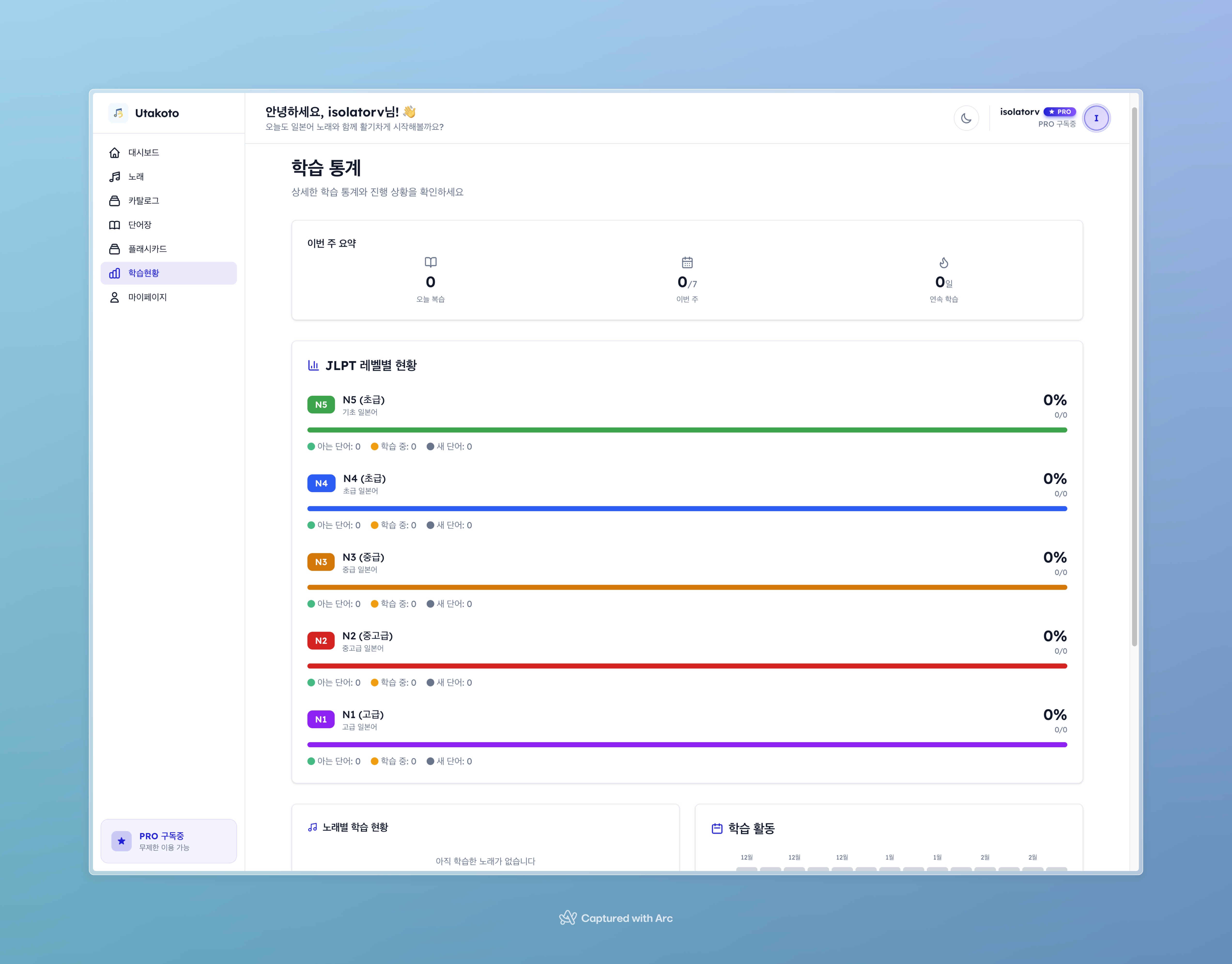
통계 페이지. JLPT 레벨별 분포 차트, 90일 복습 히트맵, 주간 요약, 곡별 학습 진행률을 시각화한다.
앞으로의 플랜
Utakoto는 현재 v4.0입니다. 핵심 기능은 전부 완성됐지만, 앞으로 추가하고 싶은 것들이 꽤 있습니다.
단기 (1-2주)
모바일 플래시카드에도 4단계 난이도 적용 확인 E2E 테스트 커버리지 확대 (현재: auth, songs, flashcards) TypeScript 타입 정의 정리 (API 응답 타입 공유) 중기 (1-3개월)
유튜브 가사 동기화 — 재생 위치에 맞춰 해당 가사 줄 하이라이트 후리가나/번역 토글 — 사용자가 표시/숨김 선택 가능 (학습 난이도 조절) 학습 추세 그래프 — 주간/월간 습득 단어 수 라인 차트 JLPT 레벨별 집중 학습 경로 장기 (3개월+)
소셜 기능 — 곡 공유, 인기 곡 차트, 커뮤니티 단어장 AI 추천 — 학습 패턴 기반 곡 추천 (JLPT 레벨 매칭) 발음 평가 — 마이크 입력으로 발음 정확도 피드백 다국어 확장 — UI 영어화, 번역 타깃 언어 선택 사족을 붙이자면, 이 프로젝트를 하면서 느낀 가장 큰 변화는 "할 수 있는 것의 범위"가 확 넓어졌다는 점입니다. 예전에는 결제 시스템이 붙는 프로젝트를 혼자 2주 만에 만든다는 건 상상도 못했습니다. AI 코딩 도구가 시니어 개발자를 대체하는 건 아니지만, 시니어 개발자의 생산성을 서너 배로 올려주는 건 확실합니다.
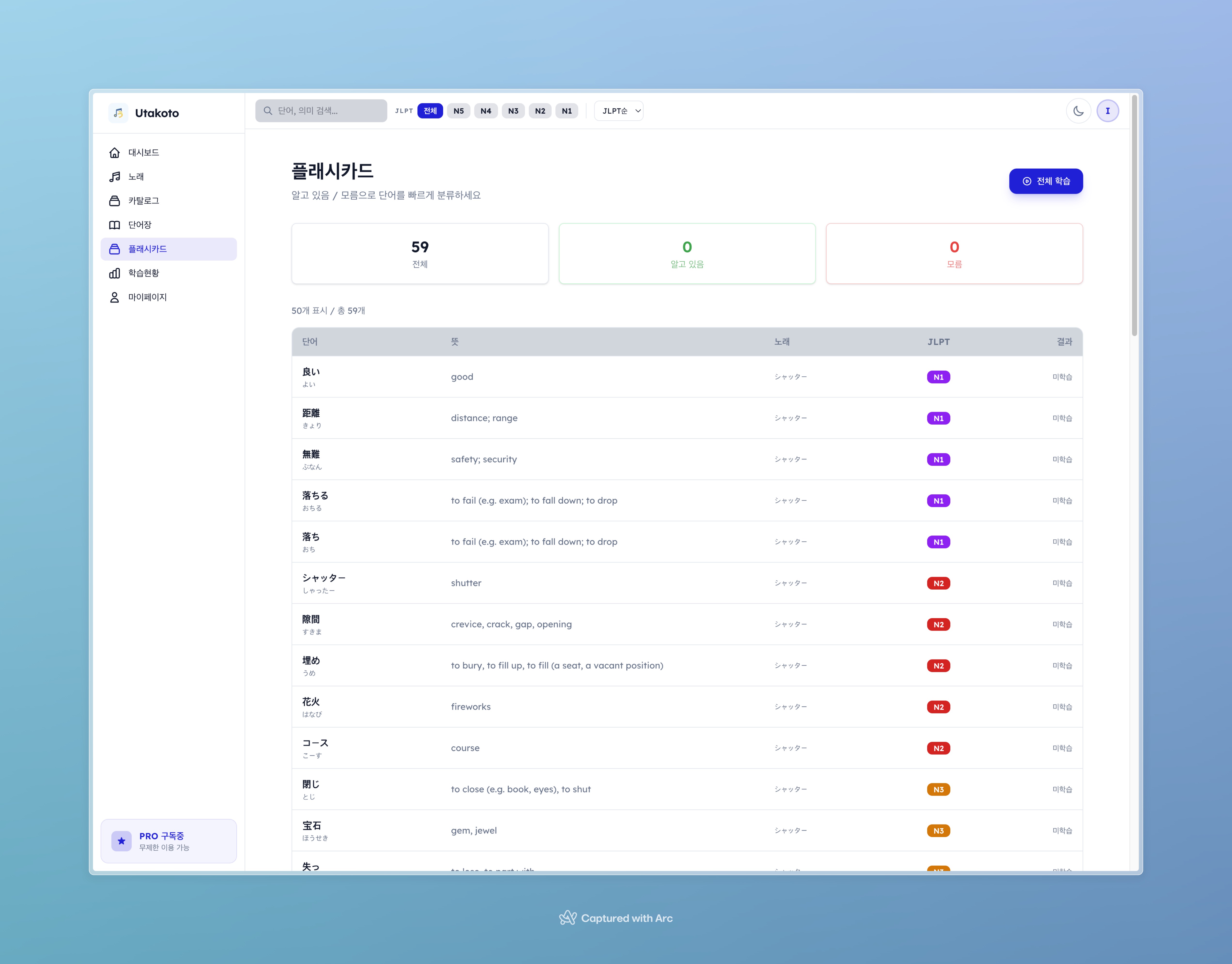
플래시카드 개요 페이지. 곡별로 복습 대상 카드가 몇 개인지, 전체 학습 상태를 파악할 수 있다.
Utakoto, 직접 써보세요
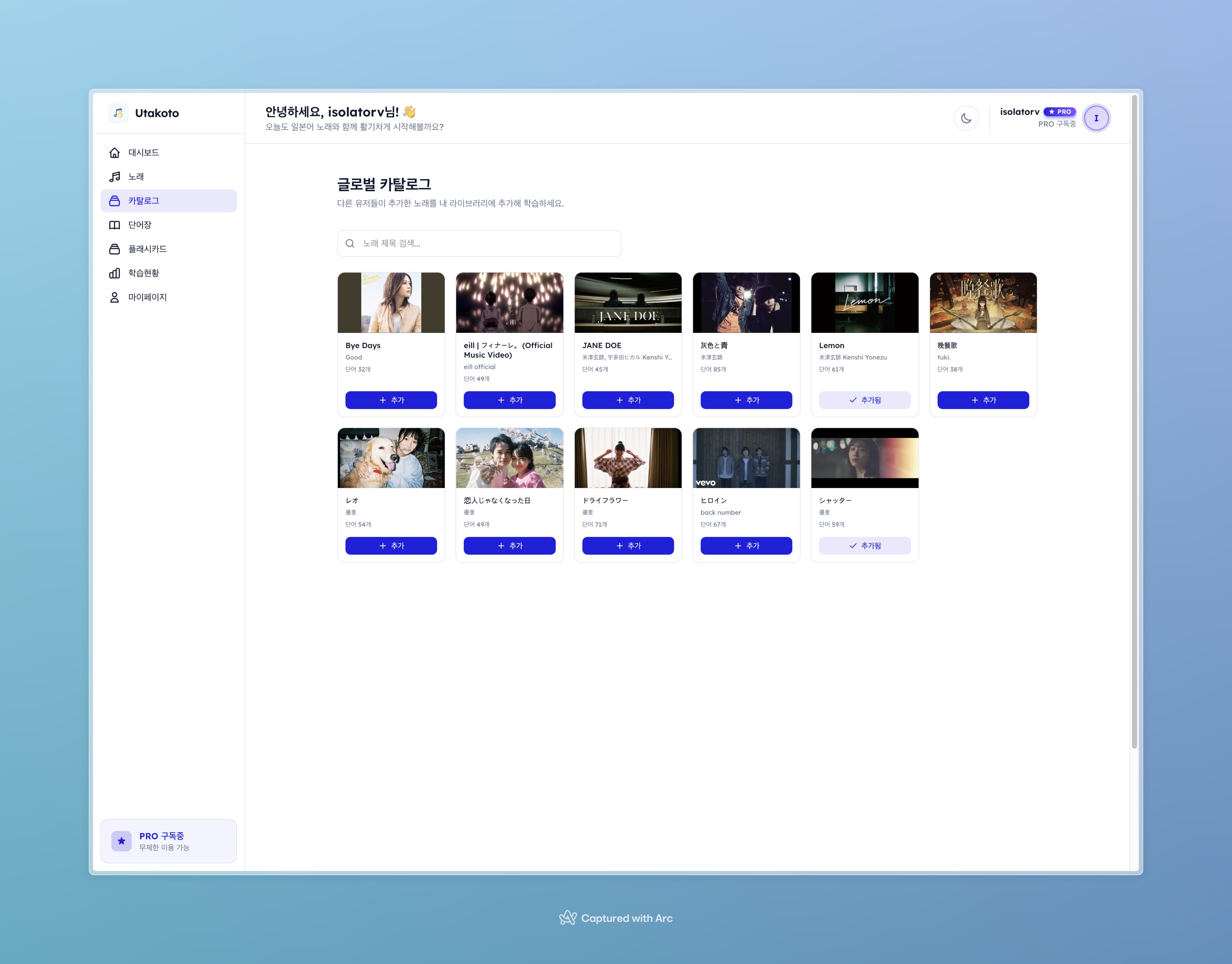
곡 카탈로그 화면. YouTube URL을 입력하면 자동으로 가사 추출부터 단어 분류까지 12단계 파이프라인이 돌아간다.
여기까지 읽으셨으면 궁금하실 것 같습니다. "그래서 실제로 쓸 만한 거야?"
직접 확인해보시는 게 가장 빠릅니다. **utakoto.space**에서 바로 체험할 수 있습니다.
이런 분에게 추천합니다
J-pop 가사가 궁금한 분 — YouTube URL만 붙여넣으면 가사, 후리가나, 한국어 번역, 발음까지 자동으로 나옵니다 Anki에 일본어 단어 카드 만들기 귀찮은 분 — 노래에서 단어를 자동 추출하고 JLPT N1~N5로 분류해줍니다. Pro 플랜이면 CSV/Anki로 내보내기도 가능합니다 일본어 복습을 까먹는 분 — SuperMemo-2 알고리즘이 최적의 복습 타이밍을 알려줍니다
시작하는 법
utakoto.space에 접속 (회원가입 없이 1곡 체험 가능) 좋아하는 일본 노래의 YouTube URL을 붙여넣기 30초~1분 후 가사와 단어가 자동으로 정리됩니다 플래시카드로 단어 복습 시작 무료 플랜으로도 5곡까지 등록 가능하고, SRS 플래시카드와 통계 기능은 제한 없이 사용할 수 있습니다. Pro 플랜(월 $1.99 / 연 $19.99)은 무제한 곡 등록과 데이터 내보내기(CSV/Anki)를 지원합니다.
아 그리고, 모바일에서도 잘 됩니다. 다크/라이트 테마 전환까지 지원하니 출퇴근길에 플래시카드 복습하기 딱 좋습니다.
피드백이나 기능 요청은 **isolatorv@gmail.com**으로 보내주시면 (진짜) 읽고 반영합니다. 1인 개발이라 반영 속도가 빠릅니다. (?)
관련 글:
-
AI 번역 실전 대결: DeepL Pro vs Google Translate AI - Utakoto 번역 엔진 선택 과정의 배경
-
GPT-5.2의 40만 토큰 컨텍스트 시대 - 대규모 컨텍스트가 AI 코딩에 미치는 영향
-
Stack Overflow 블로그 'AI 세상에서 살려면, 아는 것이 절반' - AI 시대 개발자 학습 전략 참고 자료: