지난 수요일 밤 11시쯤이었습니다. 팀 슬랙에 "이번 주 고객 피드백 정리 누가 하실 분?"이라는 메시지가 올라왔는데, 아무도 답을 안 하더라고요. 매주 스프레드시트 복붙하고, 태그 달고, 우선순위 매기는 그 작업. 저도 하기 싫었습니다.

야근의 시작은 언제나 단순 반복 작업 | 사진: Matthew Fournier, Unsplash
"이거 앱으로 만들면 안 되나?"라는 생각이 스쳤는데, 마침 그날 오전에 본 뉴스가 떠올랐습니다. BlueVector AI라는 회사에서 SnapApp이라는 노코드 AI 앱 빌더를 출시했다는 소식. 프롬프트 한 줄로 업무용 앱을 만들 수 있다고요. 반신반의하면서 바로 가입해봤습니다.
TL;DR: 30분은 과장이 아니었다 (조건부)
결론부터 말하면, 간단한 CRUD 앱은 정말 30분 안에 나옵니다. 고객 피드백을 입력받고, 카테고리별로 필터링하고, 대시보드로 보여주는 정도는 프롬프트 몇 번이면 충분했어요. 근데 "고객 감정 분석을 자동으로 붙이고 싶다"거나 "슬랙 웹훅으로 알림 보내고 싶다" 같은 요구가 들어가는 순간, 30분은 훌쩍 넘어갑니다. 결국 2시간 정도 걸렸습니다.
프로젝트: 고객 피드백 트래커 만들기
목표 vs 현실
원래 계획은 이랬습니다:
항목 목표 현실 소요 시간 30분 약 2시간 기능 범위 CRUD + 감정 분석 + 슬랙 알림 CRUD + 대시보드 (감정 분석은 수동 설정) 코딩 필요도 0% 약 15% (커스텀 함수 일부) 배포 팀 공유 가능 공유 링크 생성 성공 PRNewswire의 공식 보도(2026년 3월 11일 기준)에 따르면, SnapApp은 "소규모 비즈니스가 기존에 6자리 수(십만 달러 이상) 개발 예산이 필요했던 커스텀 도구를 14일 무료 체험 기간 내에 만들 수 있다"고 합니다. 과장이긴 한데, 방향성은 맞는 말이에요.
가장 큰 삽질 TOP 3
삽질 1: "대화로 앱 만들기"의 함정
SnapApp의 핵심 철학은 "Conversation, not Code"입니다. Google Gemini를 기반으로 자연어 프롬프트를 앱으로 변환해주는 구조인데요.
처음에 이렇게 입력했습니다:
고객 피드백을 수집하고 관리하는 앱을 만들어줘. 피드백에는 고객명, 이메일, 내용, 카테고리(버그/기능요청/칭찬), 우선순위(높음/중간/낮음)가 있어. 대시보드에서 카테고리별 통계를 보여줘.
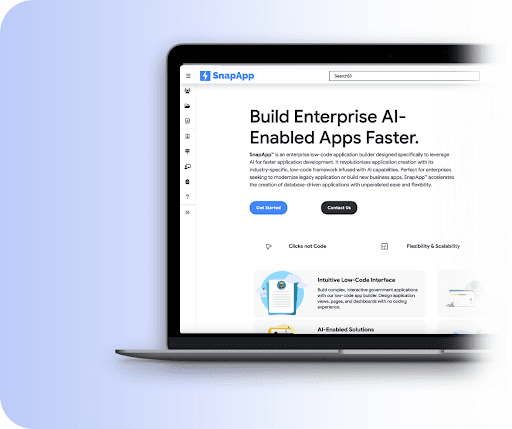
출처: BlueVector AI 공식 페이지 | SnapApp의 "Clicks not Code" 인터페이스
결과는... 꽤 괜찮았습니다. 데이터베이스 테이블이 자동으로 생성되고, 입력 폼과 리스트 뷰가 바로 나왔어요. 근데 문제는 대시보드였습니다. "카테고리별 통계"라고만 했더니 단순 카운트 테이블만 생성하더라고요. 차트가 아니라.
프롬프트를 좀 더 구체적으로 수정했습니다:
대시보드에 파이 차트로 카테고리별 비율을 보여주고, 최근 7일 접수된 피드백 수를 일별 바 차트로 표시해줘. 우선순위 '높음'인 미해결 피드백은 상단에 빨간색 배지로 강조해줘.이러니까 제대로 나왔습니다. 교훈: 노코드 AI 빌더라고 해서 "알아서 해줘"가 통하진 않습니다. 프롬프트 엔지니어링은 여기서도 핵심이에요.
삽질 2: 커스텀 로직의 벽
감정 분석 기능을 붙이려고 했습니다. 피드백 텍스트를 입력하면 자동으로 긍정/부정/중립을 태깅하는 거요. SnapApp이 Google Gemini를 내장하고 있으니까 당연히 될 줄 알았는데...
안 됩니다. 적어도 제가 시도한 시점(2026년 3월 12일)에서는, Gemini AI 연동은 "간단한 설정"으로 가능하다고 공식 문서에 나와 있지만, 실제로는 커스텀 함수를 작성해야 했습니다. 이 부분에서 약 40분을 날렸어요.
결국 외부 API를 호출하는 방식으로 우회했는데, 이 정도면 Bolt.new나 Lovable에서 직접 코드를 짜는 게 더 빨랐을 수도 있습니다.
삽질 3: 공유 설정의 미궁
앱을 팀원들에게 공유하려는데, 권한 설정이 직관적이지 않았습니다. "Sharing Rules"라는 메뉴가 있긴 한데, 이게 Enterprise 티어 기능이더라고요. $29/월 Professional에서는 기본 공유 링크만 됩니다.
TMI인데, 이 때 이미 새벽 1시였습니다.
기술 스택과 구조: 다시 한다면?
SnapApp의 내부 구조는 이렇습니다:
프론트엔드: SnapApp이 자동 생성 (React 기반 추정) 백엔드: Google Cloud 위에 올라가는 서버리스 구조 AI: Google Gemini를 통한 코드 생성 + 앱 로직 추론 DB: 내장 데이터베이스 (스키마 자동 생성) 이전에 n8n으로 블로그 자동화 시스템을 만들었을 때와 비교하면, SnapApp은 확실히 초기 셋업이 빠릅니다. n8n은 워크플로우 하나하나 노드를 연결해야 하지만, SnapApp은 프롬프트 한 번이면 전체 앱 골격이 나오니까요.
다시 한다면 바꿀 것:
프롬프트를 처음부터 상세하게 - "앱 만들어줘"가 아니라, 데이터 스키마, UI 레이아웃, 비즈니스 로직을 한 번에 기술 복잡한 AI 로직은 외부 API로 - SnapApp 내장 AI에 기대하지 말고, 감정 분석 같은 건 OpenAI API나 별도 서비스로 연결 가격 티어 먼저 확인 - 공유 기능이 필요하면 Enterprise 티어를 고려해야 함
Bolt·Lovable·Replit과 뭐가 다른가
NoCode MBA의 2026년 3월 비교 분석에 따르면, 현재 AI 앱 빌더 시장은 Bolt.new, Lovable, Replit Agent가 3강 체제입니다. SnapApp은 이 시장에 늦게 뛰어든 셈인데, 포지셔닝이 좀 다릅니다.
항목 SnapApp Bolt.new Lovable Replit Agent 주요 타깃 엔터프라이즈 업무 앱 빠른 프로토타이핑 초보자 친화 풀스택 개발자 AI 엔진 Google Gemini Anthropic Claude 자체 + 다중 자체 AI 가격(월) $29~ $20~ $20~ $25~ 강점 DB 기반 업무 앱 프레임워크 유연성 Supabase 통합 다언어 지원 약점 프론트엔드 커스터마이징 제한 외부 서비스 별도 설정 복잡한 로직 한계 학습 곡선

AI 앱 빌더 춘추전국시대 — Photo: Zulfugar Karimov/Unsplash
AI 앱 시장이 21조에서 354조 원으로 성장한다는 이야기를 이전 글에서 다뤘는데, 이런 노코드 AI 빌더들이 그 성장을 견인하는 핵심 동력인 셈입니다.
수치로 보는 이번 프로젝트
지표 수치 총 소요 시간 약 2시간 (가입~배포) 프롬프트 입력 횟수 14회 자동 생성된 DB 테이블 3개 (피드백, 카테고리, 사용자) 자동 생성된 뷰 5개 (입력폼, 리스트, 상세, 대시보드, 설정) 수동 코드 작성 약 25줄 (커스텀 함수) 비용 $0 (14일 무료 체험) 허탈한 건, 이 정도 앱을 예전에는 React + Express + PostgreSQL로 이틀은 걸려서 만들었을 거라는 점입니다. 물론 그때 만든 앱이 커스터마이징이나 확장성에서는 훨씬 자유롭겠지만요.
이건 공식 문서에 없는 팁인데요
SnapApp을 실제로 써보면서 알게 된 것 몇 가지:
프롬프트에 "테이블 스키마"를 먼저 정의하면 결과가 훨씬 좋습니다. "앱 만들어줘" 대신 "feedback 테이블: id(auto), customer_name(string), content(text), category(enum: bug, feature, praise), priority(enum: high, medium, low), created_at(datetime)" 이렇게 주면 DB 구조가 깔끔하게 나옵니다.
대시보드 차트를 요청할 때는 차트 타입을 명시하세요. "통계 보여줘"라고 하면 텍스트 테이블이 나올 확률이 높습니다. "파이 차트", "바 차트", "라인 차트"를 콕 집어야 합니다.
한국어 프롬프트도 동작합니다. Google Gemini 기반이라 한국어 이해도가 꽤 괜찮아요. 다만 필드명은 영문으로 쓰는 게 안전합니다.

노코드여도 개발자 감성은 필요하다 (Photo by Daniil Komov on Unsplash)
총평: 누구를 위한 도구인가
SnapApp은 "개발자가 빠르게 내부 도구를 만들 때" 쓰기 좋습니다. 고객 관리, 재고 추적, 승인 워크플로우 같은 CRUD 기반 업무 앱에 최적화되어 있어요. Bolt.new나 Lovable이 "외부 사용자를 위한 예쁜 웹앱"에 강하다면, SnapApp은 "팀 내부에서 쓸 업무 도구"에 포커스하고 있습니다.
AI 코딩 도구 비용 전쟁 글에서도 다뤘듯이, 이런 도구들의 가격 경쟁이 치열해지고 있는데, $29/월이면 사이드 프로젝트용으로는 살짝 부담이고, 회사 업무 도구로는 납득 가능한 수준입니다.
추천하는 사람: 스프레드시트로 관리하던 업무를 앱으로 올리고 싶은 팀 리드, PM.
비추천하는 사람: 디자인 자유도가 중요한 B2C 서비스 개발자.
다음 계획
감정 분석 기능을 OpenAI API 연동으로 제대로 붙여보기 슬랙 웹훅 연동 테스트 (Enterprise 티어 체험 신청 예정) 같은 앱을 Bolt.new로도 만들어서 직접 비교 글 작성 예정 아 그리고, 그 고객 피드백 정리 작업? 결국 SnapApp으로 만든 앱에 기존 스프레드시트 데이터를 CSV로 임포트해서 처리했습니다. 다음 주부터는 팀원들이 직접 앱에 입력하기로 했어요. 뿌듯하더라고요.
참고 자료
- SnapApp 공식 페이지 - BlueVector AI (2026년 3월 기준)
- SnapApp 출시 보도자료 - PRNewswire (2026년 3월 11일)
- Best AI App Builders 2026: Complete Comparison Guide - NoCode MBA (2026년 3월 기준)
- 20 Best AI App Builders in 2026 - Taskade Blog (2026년 기준)
관련 글:
- n8n으로 블로그 자동화 시스템 만들기: 뉴스 수집부터 포스팅까지 - 또 다른 AI 활용 자동화 프로젝트
- AI 앱 시장 21조→354조 원, 10년 만에 17배 - AI 앱 시장의 폭발적 성장 배경